 using (WebClient client = new WebClient())
            {
                byte[] ByteStream = ConvertFileIntoBtes("c:\\test.jpg");

                if (ByteStream != null)
                {
                    client.Credentials = new System.Net.NetworkCredential(USERNAME, PASSWORD);
                    client.UploadData(FTPSERVER + "/test.jpg", "STOR", ByteStream);
                }
            }
Wednesday, August 14, 2013
Upload file into FTP
this is example code for upload file into FTP site.


Function for Resize Image
this is a function that resizes the image into given size.
 private static Image resizeImage(Image imgToResize, Size size)
        {
            int sourceWidth = imgToResize.Width;
            int sourceHeight = imgToResize.Height;

            float nPercent = 0;
            float nPercentW = 0;
            float nPercentH = 0;

            nPercentW = ((float)size.Width / (float)sourceWidth);
            nPercentH = ((float)size.Height / (float)sourceHeight);

            if (nPercentH < nPercentW)
                nPercent = nPercentH;
            else
                nPercent = nPercentW;

            int destWidth = (int)(sourceWidth * nPercent);
            int destHeight = (int)(sourceHeight * nPercent);

            Bitmap b = new Bitmap(destWidth, destHeight);
            Graphics g = Graphics.FromImage((Image)b);
            g.InterpolationMode = InterpolationMode.HighQualityBicubic;

            g.DrawImage(imgToResize, 0, 0, destWidth, destHeight);
            g.Dispose();

            return (Image)b;
        }
Connection strings for MS Access and MS Excel in C#
Connecttion strings for
MS ACCESS
- OleDbConnection connection = new OleDbConnection("Provider=Microsoft.ACE.OLEDB.12.0;Data Source=electiondb.accdb;Persist Security Info=False;");
EXCEL
OleDbConnection connection = new OleDbConnection("Provider=Microsoft.ACE.OLEDB.12.0;Data Source=election.xlsx;Extended Properties='Excel 8.0;HDR=NO;IMEX=1';");
MS ACCESS
- OleDbConnection connection = new OleDbConnection("Provider=Microsoft.ACE.OLEDB.12.0;Data Source=electiondb.accdb;Persist Security Info=False;");
EXCEL
OleDbConnection connection = new OleDbConnection("Provider=Microsoft.ACE.OLEDB.12.0;Data Source=election.xlsx;Extended Properties='Excel 8.0;HDR=NO;IMEX=1';");
Get file names from FTP site
this example is how to get list of file names on specific ftp site and bind the result to RadListView with two column.
I used RadListView of Telerik. You can use standard ListView or ASP.
I used RadListView of Telerik. You can use standard ListView or ASP.
public void ListDirectory()
        {
            var request = createRequest(URL, WebRequestMethods.Ftp.ListDirectory);

            DataTable DT = new DataTable();
            DataColumn col1 = new DataColumn("URL");
            DataColumn col2 = new DataColumn("FILENAME");
            DT.Columns.Add(col1);
            DT.Columns.Add(col2);
            DT.Rows.Clear();

            using (var response = (FtpWebResponse)request.GetResponse())
            {
                using (var stream = response.GetResponseStream())
                {
                    using (var reader = new StreamReader(stream, true))
                    {
                        while (!reader.EndOfStream)
                        {
                            string line = reader.ReadLine();
                            DT.Rows.Add(URL + line, line);
                        }
                    }
                }
            }

            this.listView.DataSource = DT;
        }
private FtpWebRequest createRequest(string uri, string method)
        {
            var r = (FtpWebRequest)WebRequest.Create(uri);

            r.Credentials = new NetworkCredential(USERNAME, PASSWORD);
            r.Method = method;

            return r;
        }
Monday, December 6, 2010
C# Winform DatagridView Numeric Column Sorting
private void dataGridView1_SortCompare(object sender, DataGridViewSortCompareEventArgs e)
{
   if (e.Column.Index == 0)
   {
       if (double.Parse(e.CellValue1.ToString()) > double.Parse(e.CellValue2.ToString()))
       {
           e.SortResult = 1;
       }
       else if (double.Parse(e.CellValue1.ToString()) < double.Parse(e.CellValue2.ToString()))
       {
           e.SortResult = -1;
       }
       else
       {
           e.SortResult = 0;
       }
       e.Handled = true;
  }
}
Tuesday, November 2, 2010
Import from .csv file to DataGridView
using Microsoft.VisualBasic;
using System;
using System.Collections.Generic;
using System.ComponentModel;
using System.Configuration;
using System.Data;
using System.Data.Odbc;
using System.Drawing;
using System.IO;
using System.Text;
using System.Windows.Forms;


//  ================================================================================================
//
//  This program copies data from the data file C:\TEST.CSV to C:\TEMP.CSV
//  This is to allow modification of the title line to allow SQL to search on the line.
//  TEMP.CSV is deleted at the end of the program.
//
//  ================================================================================================

namespace ReadDataFile
{
    public partial class Form1 : Form
    {

        char[] splitArray1 = { ',', '\n', '\r' };
        char[] splitArray2 = { ' ' };

        Int64[] SearchList = new long[1];

        string CSVDataSource;
        string FileName;
        string FileSize;
        string LineText;
        string TempFileName;

        string[] DataResult1 = { "", "", "", "", "" };// Use to populate the grid.
        string[] Titles = { "Date", "Time", "Thickness", "Track Speed" };

        //Create a dataset
        DataSet dataset = new DataSet("My Dataset");
        //Create a table
        DataTable datatable = new DataTable("Temp.CSV");

        public Form1()
        {
            InitializeComponent();
            TempFileName = @"C:\Temp.csv";

            lblLoading.Visible = false;

            CreateTable();
            dataset.Tables.Add(datatable);
        }

        private void btnOpenFile_Click(object sender, EventArgs e)
        {
            // Clear datagrid contents
            dgvData.SelectAll();
            dgvData.ClearSelection();
            // Set file name
            FileName = txtFileName.Text;
            CSVDataSource = FileName;
            if (File.Exists(TempFileName))
            {
                File.Delete(TempFileName);
            }
            StreamReader sr = new StreamReader(FileName);
            StreamWriter sw = new StreamWriter(TempFileName);
// Read & dump header
            string junk = sr.ReadLine();
// Read file into string
            string FileData = sr.ReadToEnd();
            FileSize = FileData.Length.ToString("N");
            FileSize = FileSize.Substring(0, FileSize.IndexOf("."));
            lblLoading.Text = "Loading " + FileSize + "  bytes.\nPlease wait a moment or two.";
            lblLoading.Visible = true;
            lblLoading.Update();
// Change header to meet with ODBC title requirements
            sw.WriteLine(" Stream No.,Die No,Date,Time,Thickness,Status,Track");
            sw.WriteLine(LineText);
            sw.Write(FileData);
            sr.Close();
            sw.Close();
            ReadData();
            lblLoading.Visible = false;
            dgvData.Update();
            dgvData.Columns[4].HeaderText = "Track speed";
            if (File.Exists(TempFileName))
            {
                File.Delete(TempFileName);
            }
        }

        private void CreateTable()
        {
            for (int i = 0; i < 4; i++)
            {
                datatable.Columns.Add(Titles[i]);
            }
        }

        ///
        /// Open TEMP.CSV as ODBC database file
        /// Access data using SQL 'Select' command
        /// Move data from DATABASE to DataTable and assign to DataGridView object
        /// Make each column UNSORTABLE to stop user messing with data!!!
        ///
        private void ReadData()
        {
            string tempPath = "C:";
            string strConn = @"Driver={Microsoft Text Driver (*.txt; *.csv)};Dbq=" + tempPath + @"\;Extensions=asc,csv,tab,txt";
            OdbcConnection conn = new OdbcConnection(strConn);
            OdbcDataAdapter da = new OdbcDataAdapter("Select Date,Time,Thickness,Status,Track from temp.csv", conn);
            DataTable dt = new DataTable();
            da.Fill(dt);
            dgvData.DataSource = dt;
            dgvData.Columns[1].DefaultCellStyle.Format = "T";
            foreach (DataGridViewColumn col in dgvData.Columns)
            {
                col.SortMode = DataGridViewColumnSortMode.NotSortable;
            }
        }


    }
}
Friday, September 17, 2010
Using binding context with 2 tables in C#
 ....
        DataTable dt = new DataTable("One");
        DataTable dt1 = new DataTable("Two");
        DataSet ds = new DataSet();
        private void Form1_Load(object sender, EventArgs e)
        {
            dt.Columns.Add("No");
            dt.Columns.Add("Name");
            dt.PrimaryKey = new DataColumn[] {dt.Columns[0] };
            dt.Rows.Add("1", "A");
            dt.Rows.Add("2", "B");


            dt1.Columns.Add("No");
            dt1.Columns.Add("Address");

            dt1.Rows.Add("1", "Local address");
            dt1.Rows.Add("2", "Postal address");
            dt1.Rows.Add("2", "Local address");


            ds.Tables.Add(dt);
            ds.Tables.Add(dt1);
            //Relation object
            DataRelation rel = new DataRelation("relation1", dt.Columns[0], dt1.Columns[0]);
            ds.Relations.Add(rel);

            bindingSource1.DataSource = ds;
            bindingSource1.DataMember = "One";

            bindingSource2.DataSource = bindingSource1;
            bindingSource2.DataMember = "relation1";


            textBox1.DataBindings.Add("Text", bindingSource1, "No");
            textBox2.DataBindings.Add("Text", bindingSource1, "Name");
            textBox3.DataBindings.Add("Text", bindingSource2, "No");
            textBox4.DataBindings.Add("Text", bindingSource2, "Address");
        }

        private void button1_Click(object sender, EventArgs e)
        {
            bindingSource1.Position += 1;
        }

        private void button2_Click(object sender, EventArgs e)
        {
            bindingSource1.Position -= 1;
        }

        private void button3_Click(object sender, EventArgs e)
        {
            bindingSource2.Position += 1;
        }

        private void button4_Click(object sender, EventArgs e)
        {
            bindingSource2.Position  -= 1;
        }
       ...
About BindingContext in C#
When using simple list binding (see Simple List Binding) the simple bound control needs to synchronize to the "current item" of its data source. In order to do this, the binding needs to get the "Current" item for the CurrencyManager associated with the binding. The binding gets a CurrencyManager for its data source through its Control’s "BindingContext" property (a Control typically gets its BindingContext from the parent Form). The "BindingContext" is a per-Form cache of CurrencyManagers (more precisely, BindingContext is a cache of BindingManagerBase instances and BindingManagerBase is the base class of CurrencyManager).
As an example, suppose a developer had a list of Customers bound to a DataGrid control (e.g. DataGrid.DataSource is set to a list of Customers). In addition, the developer had a simple control, such as a TextBox, bound to the same list (e.g. TextBox.Text is bound to the property "Name" on the Customer list using Simple List Binding). When clicking on an item in the DataGrid, the DataGrid will make the clicked item the currently selected item. The DataGrid does this by first asking its BindingContext for the BindingManagerBase (CurrencyManager) of its data source (list). The BindingContext returns the cached BindingManagerBase (and creates one if it doesn’t exit). The DataGrid will use the BindingManagerBase API to change the "Current" item (it does this by setting the CurrencyManager Position property). When a simple binding is constructed binding it will get the BindingManagerBase (CurrencyManager) associated with its data source. It will listen to change events on the BindingManagerBase and synchronize updates to its bound property (e.g. "Text" property) with updates to the BindingManagerBase "Current" item. The key to this working correctly is that both the DataGrid and the TextBox need to be using the same CurrencyManager (BindingManagerBase). If they are using different CurrencyManagers, then the simple bound property will not correctly update when the DataGrid item changes.
As previously mentioned, Controls (and developers) can get a BindingManagerBase for a data source using a Controls BindingContext. When requesting a BindingManagerBase from the BindingContext, the BindingContext will first look in its cache for the requested BindingManagerBase. If the BindingManagerBase doesn’t exist in the cache, then the BindingContext will create and return a new one (and add it to the cache). The BindingContext is typically global per form (child controls delegate to their parents BindingContext) so BindingManagerBases (CurrencyManagers) are typically shared across all Controls on a Form. The BindingContext has two forms:
/* Get a BindingManagerBase for the given data source */
bmb = this.BindingContext[dataTable];
/* Get a BindingManagerBase for the given data source and data member */
bmb = this.BindingContext[dataSet, "Numbers"];
The first form is commonly used when getting a BindingManagerBase for a list such as an ADO.NET DataTable. The second form is used to get a BindingManagerBase for a parent data source that has child lists (e.g. DataSet with child DataTables). One of the most confusing aspects of BindingContext is using the different forms to specify the same data source you result in two different BindingManagerBases instances. This is by far and away the most common reason Controls bound to the same data source don’t synchronize (Controls use BindingContext to get a BindingManagerBase).
Sample: Control Synchronization (VS 2005) (VS Projects: CurrencyAndBindingContext and DataBinding Intro)
/* Create a DataSet with 1 DataTable */
DataSet dataSet = new DataSet();
DataTable dataTable = dataSet.Tables.Add("Numbers");
dataTable.Columns.Add("ID", typeof(int));
dataTable.Columns.Add("Name", typeof(string));
dataTable.Rows.Add(0, "Zero");
dataTable.Rows.Add(1, "One");
/*******************************************************************
* Bind the first DataGridView and TextBox to the "Numbers" table in
* dataSet. The DataGridView will use BindingContext to get a
* CurrencyManager for the data source. DataGridView1 will use
* the following form of BindingContext:
*
* bmb = BindingContext[dataSet, "Numbers"];
*
* The textBox1’s Text Binding will also get a BindingManagerBase
* and will use the following BindingContext form:
*
* bmb = BindingContext[dataSet, "Number"];
*
* Therefore both dataGridView1 and textBox1 will share the same
* BindingManagerBase (CurrencyManager).
*******************************************************************/
this.dataGridView1.DataSource = dataSet;
this.dataGridView1.DataMember = "Numbers";
this.textBox1.DataBindings.Add("Text", dataSet, "Numbers.Name", true);
/*******************************************************************
* The variable "dataTable" contains the "Numbers" table. Although
* the above DataGridView and TextBox bound to this table using
* "DataSource" and "DataMember" form, they could have bound to the
* same Table (and data) by binding directly to "dataTable" as shown
* below. When doing this, DataGridView2 will use the following form
* of BindingContext:
*
* bmb = BindingContext[dataTable];
*
* The textBox12’s Text Binding will use the following BindingContext
* form:
*
* bmb = BindingContext[dataTable];
*
* Therefore both dataGridView2 and textBox2 will share the same
* BindingManagerBase (CurrencyManager) however they will not
* share the same CurrencyManager since they used a different form
* to specify their bindings.
*******************************************************************/
this.dataGridView2.DataSource = dataTable;
this.textBox2.DataBindings.Add("Text", dataTable, "Name", true);
As an example, suppose a developer had a list of Customers bound to a DataGrid control (e.g. DataGrid.DataSource is set to a list of Customers). In addition, the developer had a simple control, such as a TextBox, bound to the same list (e.g. TextBox.Text is bound to the property "Name" on the Customer list using Simple List Binding). When clicking on an item in the DataGrid, the DataGrid will make the clicked item the currently selected item. The DataGrid does this by first asking its BindingContext for the BindingManagerBase (CurrencyManager) of its data source (list). The BindingContext returns the cached BindingManagerBase (and creates one if it doesn’t exit). The DataGrid will use the BindingManagerBase API to change the "Current" item (it does this by setting the CurrencyManager Position property). When a simple binding is constructed binding it will get the BindingManagerBase (CurrencyManager) associated with its data source. It will listen to change events on the BindingManagerBase and synchronize updates to its bound property (e.g. "Text" property) with updates to the BindingManagerBase "Current" item. The key to this working correctly is that both the DataGrid and the TextBox need to be using the same CurrencyManager (BindingManagerBase). If they are using different CurrencyManagers, then the simple bound property will not correctly update when the DataGrid item changes.
As previously mentioned, Controls (and developers) can get a BindingManagerBase for a data source using a Controls BindingContext. When requesting a BindingManagerBase from the BindingContext, the BindingContext will first look in its cache for the requested BindingManagerBase. If the BindingManagerBase doesn’t exist in the cache, then the BindingContext will create and return a new one (and add it to the cache). The BindingContext is typically global per form (child controls delegate to their parents BindingContext) so BindingManagerBases (CurrencyManagers) are typically shared across all Controls on a Form. The BindingContext has two forms:
/* Get a BindingManagerBase for the given data source */
bmb = this.BindingContext[dataTable];
/* Get a BindingManagerBase for the given data source and data member */
bmb = this.BindingContext[dataSet, "Numbers"];
The first form is commonly used when getting a BindingManagerBase for a list such as an ADO.NET DataTable. The second form is used to get a BindingManagerBase for a parent data source that has child lists (e.g. DataSet with child DataTables). One of the most confusing aspects of BindingContext is using the different forms to specify the same data source you result in two different BindingManagerBases instances. This is by far and away the most common reason Controls bound to the same data source don’t synchronize (Controls use BindingContext to get a BindingManagerBase).
Sample: Control Synchronization (VS 2005) (VS Projects: CurrencyAndBindingContext and DataBinding Intro)
/* Create a DataSet with 1 DataTable */
DataSet dataSet = new DataSet();
DataTable dataTable = dataSet.Tables.Add("Numbers");
dataTable.Columns.Add("ID", typeof(int));
dataTable.Columns.Add("Name", typeof(string));
dataTable.Rows.Add(0, "Zero");
dataTable.Rows.Add(1, "One");
/*******************************************************************
* Bind the first DataGridView and TextBox to the "Numbers" table in
* dataSet. The DataGridView will use BindingContext to get a
* CurrencyManager for the data source. DataGridView1 will use
* the following form of BindingContext:
*
* bmb = BindingContext[dataSet, "Numbers"];
*
* The textBox1’s Text Binding will also get a BindingManagerBase
* and will use the following BindingContext form:
*
* bmb = BindingContext[dataSet, "Number"];
*
* Therefore both dataGridView1 and textBox1 will share the same
* BindingManagerBase (CurrencyManager).
*******************************************************************/
this.dataGridView1.DataSource = dataSet;
this.dataGridView1.DataMember = "Numbers";
this.textBox1.DataBindings.Add("Text", dataSet, "Numbers.Name", true);
/*******************************************************************
* The variable "dataTable" contains the "Numbers" table. Although
* the above DataGridView and TextBox bound to this table using
* "DataSource" and "DataMember" form, they could have bound to the
* same Table (and data) by binding directly to "dataTable" as shown
* below. When doing this, DataGridView2 will use the following form
* of BindingContext:
*
* bmb = BindingContext[dataTable];
*
* The textBox12’s Text Binding will use the following BindingContext
* form:
*
* bmb = BindingContext[dataTable];
*
* Therefore both dataGridView2 and textBox2 will share the same
* BindingManagerBase (CurrencyManager) however they will not
* share the same CurrencyManager since they used a different form
* to specify their bindings.
*******************************************************************/
this.dataGridView2.DataSource = dataTable;
this.textBox2.DataBindings.Add("Text", dataTable, "Name", true);
About Windows Communication Foundation (WCF)
Windows Communication Foundation (WCF) is a framework for building service-oriented applications. Using WCF, you can send data as asynchronous messages from one service endpoint to another. A service endpoint can be part of a continuously available service hosted by IIS, or it can be a service hosted in an application. An endpoint can be a client of a service that requests data from a service endpoint. The messages can be as simple as a single character or word sent as XML, or as complex as a stream of binary data. A few sample scenarios include:
* A secure service to process business transactions.
* A service that supplies current data to others, such as a traffic report or other monitoring service.
* A chat service that allows two people to communicate or exchange data in real time.
* A dashboard application that polls one or more services for data and presents it in a logical presentation.
* Exposing a workflow implemented using Windows Workflow Foundation as a WCF service.
* A Silverlight application to poll a service for the latest data feeds.
While creating such applications was possible prior to the existence of WCF, WCF makes the development of endpoints easier than ever. In summary, WCF is designed to offer a manageable approach to creating Web services and Web service clients.
Features of WCF
WCF includes the following set of features. For more information, see WCF Feature Details.
* Service Orientation
One consequence of using WS standards is that WCF enables you to create service oriented applications. Service-oriented architecture (SOA) is the reliance on Web services to send and receive data. The services have the general advantage of being loosely-coupled instead of hard-coded from one application to another. A loosely-coupled relationship implies that any client created on any platform can connect to any service as long as the essential contracts are met.
* Interoperability
WCF implements modern industry standards for Web service interoperability. For more information about the supported standards, see Interoperability and Integration.
* Multiple Message Patterns
Messages are exchanged in one of several patterns. The most common pattern is the request/reply pattern, where one endpoint requests data from a second endpoint. The second endpoint replies. There are other patterns such as a one-way message in which a single endpoint sends a message without any expectation of a reply. A more complex pattern is the duplex exchange pattern where two endpoints establish a connection and send data back and forth, similar to an instant messaging program. For more information about how to implement different message exchange patterns using WCF see Contracts.
* Service Metadata
WCF supports publishing service metadata using formats specified in industry standards such as WSDL, XML Schema and WS-Policy. This metadata can be used to automatically generate and configure clients for accessing WCF services. Metadata can be published over HTTP and HTTPS or using the Web Service Metadata Exchange standard. For more information, see Metadata.
* Data Contracts
Because WCF is built using the .NET Framework, it also includes code-friendly methods of supplying the contracts you want to enforce. One of the universal types of contracts is the data contract. In essence, as you code your service using Visual C# or Visual Basic, the easiest way to handle data is by creating classes that represent a data entity with properties that belong to the data entity. WCF includes a comprehensive system for working with data in this easy manner. Once you have created the classes that represent data, your service automatically generates the metadata that allows clients to comply with the data types you have designed. For more information, see Using Data Contracts
* Security
Messages can be encrypted to protect privacy and you can require users to authenticate themselves before being allowed to receive messages. Security can be implemented using well-known standards such as SSL or WS-SecureConversation. For more information, see Windows Communication Foundation Security.
* Multiple Transports and Encodings
Messages can be sent on any of several built-in transport protocols and encodings. The most common protocol and encoding is to send text encoded SOAP messages using is the HyperText Transfer Protocol (HTTP) for use on the World Wide Web. Alternatively, WCF allows you to send messages over TCP, named pipes, or MSMQ. These messages can be encoded as text or using an optimized binary format. Binary data can be sent efficiently using the MTOM standard. If none of the provided transports or encodings suit your needs you can create your own custom transport or encoding. For more information about transports and encodings supported by WCF see Transports in Windows Communication Foundation.
* Reliable and Queued Messages
WCF supports reliable message exchange using reliable sessions implemented over WS-Reliable Messaging and using MSMQ. For more information about reliable and queued messaging support in WCF see Queues and Reliable Sessions.
* Durable Messages
A durable message is one that is never lost due to a disruption in the communication. The messages in a durable message pattern are always saved to a database. If a disruption occurs, the database allows you to resume the message exchange when the connection is restored. You can also create a durable message using the Windows Workflow Foundation (WF). For more information, see Workflow Services.
* Transactions
WCF also supports transactions using one of three transaction models: WS-AtomicTtransactions, the APIs in the System.Transactions namespace, and Microsoft Distributed Transaction Coordinator. For more information about transaction support in WCF see Transactions.
* AJAX and REST Support
REST is an example of an evolving Web 2.0 technology. WCF can be configured to process "plain" XML data that is not wrapped in a SOAP envelope. WCF can also be extended to support specific XML formats, such as ATOM (a popular RSS standard), and even non-XML formats, such as JavaScript Object Notation (JSON).
* Extensibility
The WCF architecture has a number of extensibility points. If extra capability is required, there are a number of entry points that allow you to customize the behavior of a service. For more information about available extensibility points see Extending WCF.
WCF Integration with Other Microsoft Technologies
WCF is a flexible platform. Because of this extreme flexibility, WCF is also used in several other Microsoft products. By understanding the basics of WCF, you have an immediate advantage if you also use any of these products.
The first technology to pair with WCF was the Windows Workflow Foundation (WF). Workflows simplify application development by encapsulating steps in the workflow as “activities.” In the first version of Windows Workflow Foundation, a developer had to create a host for the workflow. The next version of Windows Workflow Foundation was integrated with WCF. That allowed any workflow to be easily hosted in a WCF service; you can do this by automatically choosing the WF/WCF a project type in Visual Studio 2010 and Visual Studio 2010.
Microsoft BizTalk Server R2 also utilizes WCF as a communication technology. BizTalk is designed to receive and transform data from one standardized format to another. Messages must be delivered to its central message box where the message can be transformed using either a strict mapping or by using one of the BizTalk features such as its workflow engine. BizTalk can now use the WCF Line of Business (LOB) adapter to deliver messages to the message box.
Microsoft Silverlight is a platform for creating interoperable, rich Web applications that allow developers to create media-intensive Web sites (such as streaming video). Beginning with version 2, Silverlight has incorporated WCF as a communication technology to connect Silverlight applications to WCF endpoints.
Microsoft .NET Services is a cloud computing initiative that uses WCF for building Internet-enabled applications. Use .NET Services to create WCF services that operate across trust boundaries.
The hosting features of Windows Server AppFabric application server is specifically built for deploying and managing applications that use WCF for communication. The hosting features includes rich tooling and configuration options specifically designed for WCF-enabled applications.
* A secure service to process business transactions.
* A service that supplies current data to others, such as a traffic report or other monitoring service.
* A chat service that allows two people to communicate or exchange data in real time.
* A dashboard application that polls one or more services for data and presents it in a logical presentation.
* Exposing a workflow implemented using Windows Workflow Foundation as a WCF service.
* A Silverlight application to poll a service for the latest data feeds.
While creating such applications was possible prior to the existence of WCF, WCF makes the development of endpoints easier than ever. In summary, WCF is designed to offer a manageable approach to creating Web services and Web service clients.
Features of WCF
WCF includes the following set of features. For more information, see WCF Feature Details.
* Service Orientation
One consequence of using WS standards is that WCF enables you to create service oriented applications. Service-oriented architecture (SOA) is the reliance on Web services to send and receive data. The services have the general advantage of being loosely-coupled instead of hard-coded from one application to another. A loosely-coupled relationship implies that any client created on any platform can connect to any service as long as the essential contracts are met.
* Interoperability
WCF implements modern industry standards for Web service interoperability. For more information about the supported standards, see Interoperability and Integration.
* Multiple Message Patterns
Messages are exchanged in one of several patterns. The most common pattern is the request/reply pattern, where one endpoint requests data from a second endpoint. The second endpoint replies. There are other patterns such as a one-way message in which a single endpoint sends a message without any expectation of a reply. A more complex pattern is the duplex exchange pattern where two endpoints establish a connection and send data back and forth, similar to an instant messaging program. For more information about how to implement different message exchange patterns using WCF see Contracts.
* Service Metadata
WCF supports publishing service metadata using formats specified in industry standards such as WSDL, XML Schema and WS-Policy. This metadata can be used to automatically generate and configure clients for accessing WCF services. Metadata can be published over HTTP and HTTPS or using the Web Service Metadata Exchange standard. For more information, see Metadata.
* Data Contracts
Because WCF is built using the .NET Framework, it also includes code-friendly methods of supplying the contracts you want to enforce. One of the universal types of contracts is the data contract. In essence, as you code your service using Visual C# or Visual Basic, the easiest way to handle data is by creating classes that represent a data entity with properties that belong to the data entity. WCF includes a comprehensive system for working with data in this easy manner. Once you have created the classes that represent data, your service automatically generates the metadata that allows clients to comply with the data types you have designed. For more information, see Using Data Contracts
* Security
Messages can be encrypted to protect privacy and you can require users to authenticate themselves before being allowed to receive messages. Security can be implemented using well-known standards such as SSL or WS-SecureConversation. For more information, see Windows Communication Foundation Security.
* Multiple Transports and Encodings
Messages can be sent on any of several built-in transport protocols and encodings. The most common protocol and encoding is to send text encoded SOAP messages using is the HyperText Transfer Protocol (HTTP) for use on the World Wide Web. Alternatively, WCF allows you to send messages over TCP, named pipes, or MSMQ. These messages can be encoded as text or using an optimized binary format. Binary data can be sent efficiently using the MTOM standard. If none of the provided transports or encodings suit your needs you can create your own custom transport or encoding. For more information about transports and encodings supported by WCF see Transports in Windows Communication Foundation.
* Reliable and Queued Messages
WCF supports reliable message exchange using reliable sessions implemented over WS-Reliable Messaging and using MSMQ. For more information about reliable and queued messaging support in WCF see Queues and Reliable Sessions.
* Durable Messages
A durable message is one that is never lost due to a disruption in the communication. The messages in a durable message pattern are always saved to a database. If a disruption occurs, the database allows you to resume the message exchange when the connection is restored. You can also create a durable message using the Windows Workflow Foundation (WF). For more information, see Workflow Services.
* Transactions
WCF also supports transactions using one of three transaction models: WS-AtomicTtransactions, the APIs in the System.Transactions namespace, and Microsoft Distributed Transaction Coordinator. For more information about transaction support in WCF see Transactions.
* AJAX and REST Support
REST is an example of an evolving Web 2.0 technology. WCF can be configured to process "plain" XML data that is not wrapped in a SOAP envelope. WCF can also be extended to support specific XML formats, such as ATOM (a popular RSS standard), and even non-XML formats, such as JavaScript Object Notation (JSON).
* Extensibility
The WCF architecture has a number of extensibility points. If extra capability is required, there are a number of entry points that allow you to customize the behavior of a service. For more information about available extensibility points see Extending WCF.
WCF Integration with Other Microsoft Technologies
WCF is a flexible platform. Because of this extreme flexibility, WCF is also used in several other Microsoft products. By understanding the basics of WCF, you have an immediate advantage if you also use any of these products.
The first technology to pair with WCF was the Windows Workflow Foundation (WF). Workflows simplify application development by encapsulating steps in the workflow as “activities.” In the first version of Windows Workflow Foundation, a developer had to create a host for the workflow. The next version of Windows Workflow Foundation was integrated with WCF. That allowed any workflow to be easily hosted in a WCF service; you can do this by automatically choosing the WF/WCF a project type in Visual Studio 2010 and Visual Studio 2010.
Microsoft BizTalk Server R2 also utilizes WCF as a communication technology. BizTalk is designed to receive and transform data from one standardized format to another. Messages must be delivered to its central message box where the message can be transformed using either a strict mapping or by using one of the BizTalk features such as its workflow engine. BizTalk can now use the WCF Line of Business (LOB) adapter to deliver messages to the message box.
Microsoft Silverlight is a platform for creating interoperable, rich Web applications that allow developers to create media-intensive Web sites (such as streaming video). Beginning with version 2, Silverlight has incorporated WCF as a communication technology to connect Silverlight applications to WCF endpoints.
Microsoft .NET Services is a cloud computing initiative that uses WCF for building Internet-enabled applications. Use .NET Services to create WCF services that operate across trust boundaries.
The hosting features of Windows Server AppFabric application server is specifically built for deploying and managing applications that use WCF for communication. The hosting features includes rich tooling and configuration options specifically designed for WCF-enabled applications.
Tuesday, February 23, 2010
Print a Text File in C#
In this article, you will learn how to print a text file in C#.
Step 1.
Create a Windows Forms application using Visual Studio and add two Button and one TextBox controls to the Form. Change names for the Buttons to Browse and Print respectively.
Step 2.
Write the following code on the Browse button click event handler.
Before we write code on the Print button click event handler, define two private variables on class level.
Now build and run the application. Click Browse button and open a text file and click Print button to print the file contents.
Step 1.
Create a Windows Forms application using Visual Studio and add two Button and one TextBox controls to the Form. Change names for the Buttons to Browse and Print respectively.
Step 2.
Write the following code on the Browse button click event handler.
OpenFileDialog fdlg = new OpenFileDialog();Step 3.
fdlg.Title = "C# Corner Open File Dialog";
fdlg.InitialDirectory = @"C:\ ";
fdlg.Filter = "Text files (*.txt | .txt | All files (*.*) | *.*";
fdlg.FilterIndex = 2;
fdlg.RestoreDirectory = true;
if (fdlg.ShowDialog() == DialogResult.OK)
{
textBox1.Text = fdlg.FileName;
}
Before we write code on the Print button click event handler, define two private variables on class level.
private Font verdana10Font;Now import these two namespace.
private StreamReader reader;
using System.IO;Write the following code on Print button click event handler.
using System.Drawing.Printing;
string filename=textBox1.Text.ToString();And add the following method to the class.
//Create a StreamReader object
reader = new StreamReader (filename);
//Create a Verdana font with size 10
verdana10Font = new Font ("Verdana", 10);
//Create a PrintDocument object
PrintDocument pd = new PrintDocument();
//Add PrintPage event handler
pd.PrintPage += new PrintPageEventHandler(this.PrintTextFileHandler);
//Call Print Method
pd.Print();
//Close the reader
if (reader != null)
reader.Close();
private void PrintTextFileHandler (object sender, PrintPageEventArgs ppeArgs)Step 4.
{
//Get the Graphics object
Graphics g = ppeArgs.Graphics;
float linesPerPage = 0;
float yPos = 0;
int count = 0;
//Read margins from PrintPageEventArgs
float leftMargin = ppeArgs.MarginBounds.Left;
float topMargin = ppeArgs.MarginBounds.Top;
string line = null;
//Calculate the lines per page on the basis of the height of the page and the height of the font
linesPerPage = ppeArgs.MarginBounds.Height/verdana10Font.GetHeight(g);
//Now read lines one by one, using StreamReader
while (linesPerPage > count && (( line = reader.ReadLine ()) != null))
{
//Calculate the starting position
yPos = topMargin + (count * verdana10Font.GetHeight (g));
//Draw text
g.DrawString (line, verdana10Font, Brushes.Black, leftMargin, yPos, new StringFormat());
//Move to next line
count++;
}
//If PrintPageEventArgs has more pages to print
if (line != null)
{
ppeArgs.HasMorePages = true;
}
else
{
ppeArgs.HasMorePages = false;
}
}
Now build and run the application. Click Browse button and open a text file and click Print button to print the file contents.
Monday, February 22, 2010
Printing windows form in C#
Introduction
Vb.net has a PrintForm method but C# does not have inbuilt method for printing a windows form.The following procedure enables us to print a windows form at runtime in c#.net.The base concept involves the capture of the screen image of the windows form in jpeg format during runtime and printing the same on a event like Print button click.
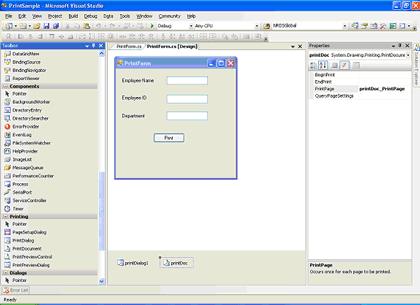
Open a new windows form project and add a new windows form. Include simple controls(label,textbox,button) on the form.From the toolbox,include PrintDialog,PrintDocument components in the form.

In the code behind
Include the following namespaces
The captured image is saved in jpeg format in the defined location.When the print functionality is used throughout an application and the image is not required to be stored, the existing image file is deleted and the new one created is streamed to print.If the image is required to be stored, the filename can be specified at runtime and stored in the given path.
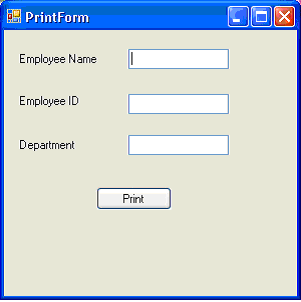
On running the application,the form is displayed as in the image below

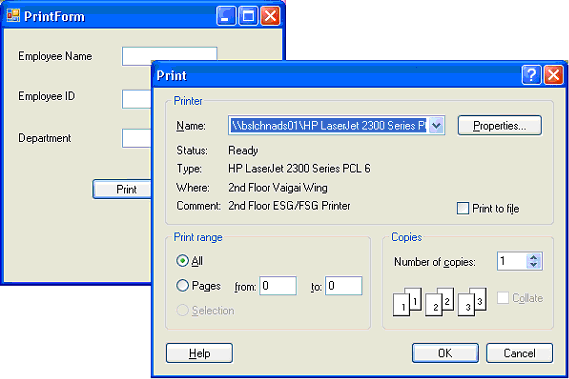
On click of the Print button, the Print dialog is displayed.

Vb.net has a PrintForm method but C# does not have inbuilt method for printing a windows form.The following procedure enables us to print a windows form at runtime in c#.net.The base concept involves the capture of the screen image of the windows form in jpeg format during runtime and printing the same on a event like Print button click.
Open a new windows form project and add a new windows form. Include simple controls(label,textbox,button) on the form.From the toolbox,include PrintDialog,PrintDocument components in the form.
In the code behind
Include the following namespaces
using System.Drawing.Imaging;and import the following .dll for the necessary GDI functions
using System.Drawing.Printing;
[System.Runtime.InteropServices.DllImportAttribute("gdi32.dll")]
The following code is placed in the declaration section of the form. The BitBlt function performs a bit-block transfer of the color data corresponding to a rectangle of pixels from the specified source device context into a destination device context.private System.IO.Stream streamToPrint;Select the PrintPage event of the PrintDocument component and include the following code in the event
string streamType;
private static extern bool BitBlt
(
IntPtr hdcDest, // handle to destination DC
int nXDest, // x-coord of destination upper-left corner
int nYDest, // y-coord of destination upper-left corner
int nWidth, // width of destination rectangle
int nHeight, // height of destination rectangle
IntPtr hdcSrc, // handle to source DC
int nXSrc, // x-coordinate of source upper-left corner
int nYSrc, // y-coordinate of source upper-left corner
System.Int32 dwRop // raster operation code
);
private void printDoc_PrintPage(object sender, System.Drawing.Printing.PrintPageEventArgs e)Include the following code in the Print Click event handler
{
System.Drawing.Image image = System.Drawing.Image.FromStream
this.streamToPrint;
int x = e.MarginBounds.X;
int y = e.MarginBounds.Y;
int width = image.Width;
int height = image.Height;
if ((width / e.MarginBounds.Width) > (height / e.MarginBounds.Height))
{
width = e.MarginBounds.Width;
height = image.Height * e.MarginBounds.Width / image.Width;
}
else
{
height = e.MarginBounds.Height;
width = image.Width * e.MarginBounds.Height / image.Height;
}
System.Drawing.Rectangle destRect = new System.Drawing.Rectangle(x, y, width, height);
e.Graphics.DrawImage(image, destRect, 0, 0, image.Width, image.Height, System.Drawing.GraphicsUnit.Pixel);
}
private void btnPrint_Click(object sender, EventArgs e)And the StatrtPrint method to customize the PrintDialog and print the stored image
{
Graphics g1 = this.CreateGraphics();
Image MyImage = new Bitmap(this.ClientRectangle.Width, this.ClientRectangle.Height, g1);
Graphics g2 = Graphics.FromImage(MyImage);
IntPtr dc1 = g1.GetHdc();
IntPtr dc2 = g2.GetHdc();
BitBlt(dc2, 0, 0, this.ClientRectangle.Width, this.ClientRectangle.Height, dc1, 0, 0, 13369376);
g1.ReleaseHdc(dc1);
g2.ReleaseHdc(dc2);
MyImage.Save(@"c:\PrintPage.jpg", ImageFormat.Jpeg);
FileStream fileStream = new FileStream(@"c:\PrintPage.jpg", FileMode.Open, FileAccess.Read);
StartPrint(fileStream, "Image");
fileStream.Close();
if (System.IO.File.Exists(@"c:\PrintPage.jpg"))
{
System.IO.File.Delete(@"c:\PrintPage.jpg");
}
}
public void StartPrint(Stream streamToPrint, string streamType)
{
     this.printDoc.PrintPage += new PrintPageEventHandler(printDoc_PrintPage);
     this.streamToPrint = streamToPrint;
     this.streamType = streamType;
     System.Windows.Forms.PrintDialog PrintDialog1 = new PrintDialog();
     PrintDialog1.AllowSomePages = true;
     PrintDialog1.ShowHelp = true;
     PrintDialog1.Document = printDoc;
     DialogResult result = PrintDialog1.ShowDialog();
     if (result == DialogResult.OK)
     {
         printDoc.Print();
         //docToPrint.Print();
     }
}
The captured image is saved in jpeg format in the defined location.When the print functionality is used throughout an application and the image is not required to be stored, the existing image file is deleted and the new one created is streamed to print.If the image is required to be stored, the filename can be specified at runtime and stored in the given path.
On running the application,the form is displayed as in the image below
On click of the Print button, the Print dialog is displayed.
Thursday, February 11, 2010
How to keep a form always on top in C#
public void MakeOnTop(Form myTopForm)
{
   myTopForm.TopMost = true;
}
Thursday, August 27, 2009
Set color of rows in XtraDatagrid in C#
Sometimes we need to set backcolor of row of XtraDatagrid.

I have found the solution of this problem. We should use RowStyle event of XtraDatagrid.
private void gridView1_RowStyle(object sender, DevExpress.XtraGrid.Views.Grid.RowStyleEventArgs e)
{
if (e.RowHandle >= 0)
{
DataRow DR = gridView1.GetDataRow(e.RowHandle);
if (DR["SEX"].ToString() == "Male")
e.Appearance.BackColor = System.Drawing.Color.LightGoldenrodYellow;
if (DR["Age"].ToString() < "20")
e.Appearance.BackColor = System.Drawing.Color.Bisque;
if (DR["OCCUPATION"].ToString() == "Engineer")
e.Appearance.BackColor = System.Drawing.Color.LightBlue;
// etc...
}
}

I have found the solution of this problem. We should use RowStyle event of XtraDatagrid.
private void gridView1_RowStyle(object sender, DevExpress.XtraGrid.Views.Grid.RowStyleEventArgs e)
{
if (e.RowHandle >= 0)
{
DataRow DR = gridView1.GetDataRow(e.RowHandle);
if (DR["SEX"].ToString() == "Male")
e.Appearance.BackColor = System.Drawing.Color.LightGoldenrodYellow;
if (DR["Age"].ToString() < "20")
e.Appearance.BackColor = System.Drawing.Color.Bisque;
if (DR["OCCUPATION"].ToString() == "Engineer")
e.Appearance.BackColor = System.Drawing.Color.LightBlue;
// etc...
}
}
To get a value of a cell of focused row of XtraDatagrid in C#
Before I used the code below to get cell value of XtraDatagrid.
string FirstName = gridView1.GetFocusedDataRow().ItemArray[2].ToString();
But in this case I must know the index of fields in Datasource. it is very difficult in very big tables.
Now I found very way to get a value of a cell of focused row of XtraDatagrid.
DataRow DR = gridView1.GetDataRow(gridView1.FocusedRowHandle);
string FirstName = DR["FIRSTNAME"].ToString();
string FirstName = gridView1.GetFocusedDataRow().ItemArray[2].ToString();
But in this case I must know the index of fields in Datasource. it is very difficult in very big tables.
Now I found very way to get a value of a cell of focused row of XtraDatagrid.
DataRow DR = gridView1.GetDataRow(gridView1.FocusedRowHandle);
string FirstName = DR["FIRSTNAME"].ToString();
Monday, February 2, 2009
Web 3.0
Google, with the cooperation of prestigious libraries, has been digitizing books to make them findable. The practice excites futurists but angers some publishers. Of necessity, digitization creates virtual copies. The publishers claim that such duplication violates copyright, even if the book’s content is hidden from the public. The New York Public Library, one of Google’s partners in the project, recently hosted a public debate on the subject.
It was while attending that debate that my discomfort with the hype surrounding an emerging genre of web development turned into a full-blown hate-on.
The big room was packed. There were more ticket holders than chairs. Yet the seat in front of me remained empty. Each time a hopeful standee approached the empty chair—and this happened every few nanoseconds—the poor schmoe seated next to it had to apologetically explain, “Sorry, the seat is occupied.”
It soon became clear that the kindly schmoe was reserving the seat, not for a friend or colleague, but for a stranger who had imposed that duty on him. While the kindly fellow defended the other man’s throne against a steady stream of resentful ticket holders, the stranger was off somewhere knocking back the library’s free champagne. I wondered what kind of jackass would ask someone he didn’t know to save his seat for thirty minutes at an oversold event. When he finally arrived, I found out.
A taste of ass
“Were you at the Web 2.0 conference?” the arriving man asked, by way of thanking the other for saving his place. The kindly schmoe signified in the negative. This was all the encouragement our man needed to launch into an adjective-rich and fact-poor monologue that was loud enough for half the room to hear.
It soon appeared that “Web 2.0” was not only bigger than the Apocalypse but also more profitable. Profitable, that is, for investors like the speaker. Yet the new gold rush must not be confused with the dot-com bubble of the 1990s:
“Web 1.0 was not disruptive. You understand? Web 2.0 is totally disruptive. You know what XML is? You’ve heard about well-formedness? Okay. So anyway—”
And on it ran, like a dentist’s drill in the Gulag.
At first I tolerated the pain by mentally modifying the famous scene from Annie Hall:
HIM: “I teach a venture capitalist workshop, so I think my insights into XML have a great deal of validity.”
ME: “Oh, really? Because I happen to have Mr. Bray right here.”
Later I gnawed my knuckles. At some point, in a kind of fever, I may have moaned. Blessedly, at last the lights dimmed and the night’s real speakers redeemed the evening.
But the ass whose braying I’d endured left a bad taste.
Less noise, more signal
Let us now define and disclaim.
The jerk at the library event was in love with his own noise, and the problem with noise is that it interferes with signals. What is the signal? What, if anything, does “Web 2.0” mean? What is the good thing that the hype risks obscuring?
Well, there are several good things, it seems to me.
Some small teams of sharp people—people who once, perhaps, worked for those with dimmer visions—are now following their own muses and designing smart web applications. Products like Flickr and Basecamp are fun and well-made and easy to use.
That may not sound like much. But ours is a medium in which, more often than not, big teams have slowly and expensively labored to produce overly complex web applications whose usability was near nil on behalf of clients with at best vague goals. The realization that small, self-directed teams powered by Pareto’s Principle can quickly create sleeker stuff that works better is not merely bracing but dynamic. As 100 garage bands sprang from every Velvet Underground record sold, so the realization that one small team can make good prompts 100 others to try.
The best and most famous of these new web products (i.e. the two I just mentioned) foster community and collaboration, offering new or improved modes of personal and business interaction. By virtue of their virtues, they own their categories, which is good for the creators, because they get paid.
It is also good for our industry, because the prospect of wealth inspires smart developers who once passively took orders to start thinking about usability and design, and to try to solve problems in a niche they can own. In so doing, some of them may create jobs and wealth. And even where the payday is smaller, these developers can raise the design and usability bar. This is good for everyone. If consumers can choose better applications that cost less or are free, then the web works better, and clients are more likely to request good (usable, well-designed) work instead of the usual schlock.
Of this they spin
In addition to favoring simpler solutions built by leaner teams, the stuff labeled “Web 2.0” tends to have technological commonalities.
On the back end, it is most often powered by open source technologies like PHP or (especially) Ruby on Rails.
On the front end, it is mainly built with web standards—CSS for layout, XML for data, XHTML for markup, JavaScript and the DOM for behavior—with a little Microsoft stuff thrown in.When web standards with a little Microsoft stuff thrown in are used to create pages that can interact with the server without refreshing, the result is web apps that feel peppy and, dare we say it, Flash-like. In a white paper that actually got read, writer/consultant Jesse James Garrett named what I’ve just described. He called it AJAX, and the acronym not only took, it helped interactivity powered by these technologies gain traction in the marketplace.
Here is where the spinners bedazzle the easily confused. Consider this scenario:
Steven, a young web wiz, has just celebrated his bar mitzvah. He received a dozen gifts and must write a dozen thank-you notes. Being webbish, he creates an on-line “Thank-You Note Generator.” Steven shows the site to his friends, who show it to their friends, and soon the site is getting traffic from recipients of all sorts of gifts, not just bar mitzvah stuff.
If Steven created the site with CGI and Perl and used tables for layout, this is the story of a boy who made a website for his own amusement, perhaps gaining social points in the process. He might even contribute to a SXSW Interactive panel.
But if Steven used AJAX and Ruby on Rails, Yahoo will pay millions and Tim O’Reilly will beg him to keynote.Who weeps for AJAX?
We pause but a moment to consider two AJAX-related headaches.
The first afflicts people who make websites. Wireframing AJAX is a bitch. The best our agency has come up with is the Chuck Jones approach: draw the key frames. Chuck Jones had an advantage: he knew what Bugs Bunny was going to do. We have to determine all the things a user might do, and wireframe the blessed moments of each possibility.
The second problem affects all who use an AJAX-powered site. If web signifiers and conventions are still in their infancy, then AJAX-related signifiers and conventions are in utero. I am still discovering features of Flickr. Not new features—old ones. You find some by clicking in empty white space. This is like reading the news by pouring ACME Invisible Ink Detector on all pieces of paper that cross your path until you find one that has words on it.
I am not knocking Flickr. I love Flickr. I wish I were as gifted as the people who created it. I’m merely pointing out complex design problems that will not be solved overnight or by a single group. In Ma.gnolia, which is now in beta, we used small icons to indicate that additional actions could be taken and to hint at what those actions might be. We succeeded to the extent that 16px by 16px drawings can communicate such concepts as “you may edit these words by clicking on them.”
These problems and others will be solved, most likely by someone reading this page. One points to these issues mainly to dent a swelling of unthinking euphoria. We have been down this road before.
Bubble, bubble
When I started designing websites, if the guy on the plane next to me asked what I did, I had to say something like “digital marketing” if I wanted to avoid the uncomprehending stare.
A few years later, if I told the passenger beside me I was a web designer, he or she would regard me with a reverence typically reserved for Stanley-Cup-winning Nobel Laureate rock stars.
Then the bubble burst, and the same answer to the same question provoked looks of pity and barely concealed disgust. I remember meeting a high-rolling entrepreneur in the early 2000s who asked what I did. I should have told him I hung around playgrounds, stealing children’s lunch money. He would have had more respect for that answer.
I hated the bubble. I hated it when Vanity Fair or New York Magazine treated web agency founders like celebrities. I hated that mainstream media and the society it informs either ignored the web or mistook it for a high-stakes electronic version of the fashion industry.When the bubble burst, these same geniuses decided the web was of no interest at all. Funny, to me it was more interesting than ever. To me it was people and organizations publishing content that might not otherwise have seen light. It was small businesses with realistic goals delivering value and growing. It was traditional publishers finding their way into a new digital medium, helped by folks like you and me. It was new ways of talking and sharing and loving and selling and healing and being. Hardly dull.
Eventually the uninformed stopped seeing a wasteland and started seeing bloggers, by which they meant only those bloggers who wrote about politics, most often from the extreme left or right. The web was “back” even though it had never left. (Of course, the fifth time you hear Wolf Blitzer say “blogger” or ask, “what do the bloggers have to tell us about these still-unfolding events?” the joke is stale and you wish those who don’t get the web would go back to ignoring it.)
But nothing, not even the rants of political bloggers, was as exciting as the scent of money. As the first properly valued “Web 2.0” properties began to find buyers, a frenzy like the old one popped hideously back to life. Yahoo spent how much? Google bought what? Here was real blood in the water.But how to persuade the other sharks in the tank that this blood feast was different from the previous boom-and-bust? Easy: Dismiss everything that came before as “Web 1.0.”
It’s only castles burning
To you who are toiling over an AJAX- and Ruby-powered social software product, good luck, God bless, and have fun. Remember that 20 other people are working on the same idea. So keep it simple, and ship it before they do, and maintain your sense of humor whether you get rich or go broke. Especially if you get rich. Nothing is more unsightly than a solemn multi-millionaire.
To you who feel like failures because you spent last year honing your web skills and serving clients, or running a business, or perhaps publishing content, you are special and lovely, so hold that pretty head high, and never let them see the tears.
As for me, I’m cutting out the middleman and jumping right to Web 3.0. Why wait?
Monday, January 26, 2009
Objects & Classes in C#
In this article we will understand some of the concepts of object-oriented programming in C# like objects and classes. To read this article you must have C# programming basics.
NOTE: read the whole article because there are some concepts you may will not get the best of it until you finish the article. And we will revisit all the concepts more than one time when I see it's appropriate in future articles so don't worry at all.
Introduction:
OOP stands for Object-Oriented Programming. OOP is relatively a new way to program computer applications. Before OOP programmers used to creating computer applications using procedural-programming (or structure-programming) but when OOP solved a lot of the problems of the procedural-programming so almost all of the programmers and developers began using OOP languages. In procedural- programming all the program functionality written in a few modules of code or maybe one module (depending on the program) and these modules depend on one another and maybe if you change a line of code you will have to rewrite the whole module again and maybe the whole program but in Object-Oriented Programming programmers write independent parts of a program called classes each class represent a part of the program functionality and these classes can be assembled to form a program and when you need to change some of the program functionality all what you have to do is to replace the target class which may contain a problem. So in OOP applications create by the use of classes and these applications can contain any number of classes. That will get us to discuss the Class and Object concept.
Classes and objects:
You may find it not easy to understand the class and object story but I will try to do my best explaining it. Actually the class and object concept is related to each other and some beginners don't care about understanding it clear so I think they will have a hard times learning C#.
Object-Oriented concept takes the most of its functionality from the real-life concepts. For example, I will discuss the concept of Classes and Objects of the world first and then you will understand the computer's Classes and Objects before I even write anything about it.
World's Classes and Objects:
In our world we have a classes and objects for those classes. Everything in our world considered to be an object. For example, people are objects, animals are objects too, minerals are objects, everything in the world are objects. Easy right ? but what about classes. In our world we have to differentiate between objects that we are living with. So we must understand that there are a classifications (this is how they get the name and the concepts of the Class) for all of those objects. For example, I'm an object, David is object too, Maria is another object so we are from a people class (or type). I have a dog called Ricky so it's an object, My friend's dog called Doby is also an object so they are from a Dogs class (or type). A third example, I have a computer Pentium III this is object, My friend have a computer Pentium IIII so this is another object and they are from a Computers class (or type). Now I think you got the concept of the Class and Object but let me crystallize it for you. In our world we have a classifications for objects and every object must be from some classification. so a Class is a way for describing some properties and functionalities or behaviors of a group of objects. In other words, The class considered to be a template for some objects. So maybe I will create a class called person so this is a template of the functionality and the properties of persons. I explained it by more than a way so wait until you see the first example and I think you will grasp it completely.
Computer's Classes and Objects:
Computer's Classes discussion is similar to what you grasp from the last section with some modifications to become computerized.
A C# Class Considered being the primary building block of the language. What I mean by the primary building block of the language is that every time you work with C# you will create Classes to form a program. We use Classes as a template to put the properties and functionalities or behaviors in one building block for some group of objects and after that we use that template to create the objects we need. For example, We need to have persons objects in our program so the first thing to do here is to create a Class called Person that contains all the functionalities or behaviors and properties of any person and after that we will use that Class or template to create as many objects as we need. Creating object of a specific class type called "instance of the class". Don't worry if you didn't grasp it 100% and don't worry if you don't know what's the Class and Object's properties and functionalities or behaviors because we still in the beginning and until now I didn't give any code examples. So let's take a brief of what's the Class and what's an object ?
The Class : Is a building block that contains the properties and functionalities that describe some group of objects, We can create a class Person that contains:
1- The properties of any normal person on the earth like : Hair Color, Age, Height, Weight, Eyes Color.
2- The functionalities or behaviors of any normal person on the earth like : Drink water, Eat, Go to the work and later we will see how we can implement the functionalities or behaviors and properties.
There are 2 kinds of classes : The built-it classes that come with the .NET Framework and called Framework Class Library. And the programmer defined-classes which we create it.
The class contains data (in the form of variables and properties) and behaviors (in the form of methods to process these data). We will understand this concept more later in the article.
When we declare a variable in a class we call it member variables or instance variables. The name instance come from the fact that when we create an object we instance a class to create that object so instance of a class means object of that class and instance variable means variable that exists in that class.
The Object : It's object of some classification (or class, or type. All means the same thing) and when you create the object you can specify the properties of that object. What I mean here is me as an object can have a different properties (Hair Color, Age, Height, Weight) of you as another object. For example, I have a brown eyes and you have a green eyes so when I create 2 objects I will specify a brown color for my object's Eyes Color property and I will specify a green color for your object's Eyes Color property.
So to complete my introduction to Classes we must discuss Properties and Variables.
Properties and Variables:
Variables declared in a class store the data for each instance, What that means ? means that when you instantiate this class (that is, When you create an object of this class) the object will allocate a memory locations to store the data of its variables. Let's take an example to understand it well.
class Person
{
public int Age;
public string HairColor;
}
This is our simple class which contains 2 variables. Don't worry about public keyword now because we will talk about it later . Now we will instantiate this class (that is, When you create an object of this class).
static void Main(string[] args)
{
Person Michael = new Person();
Person Mary = new Person();
// Specify some values for the instance variables
Michael.Age = 20;
Michael.HairColor = "Brown";
Mary.Age = 25;
Mary.HairColor = "Black";
// print the console's screen some of the variable's values
Console.WriteLine("Michael's age = {0}, and Mary's age = {1}",Michael.Age,
Mary.Age);
Console.ReadLine();
}
So we begin our Main method by creating 2 objects of Person type. After creating the 2 objects we initialize the instance variables for object Michael and then for object Mary. Finally we print some values to the console. here when you create Michael object C# compiler allocate a memory location for the 2 instance variables to put the values there. Also the same thing with Mary object the compiler will create 2 variables in the memory for Mary object. So each object now contains a different data. Note that we directly accessed the variables and we put any values we want, Right ? so maybe someone doesn't like me will put in my object's variable Age value of 120 years so I will not get any kind of jobs. But wait there are a solution for this problem. We will use properties.
Properties:
Properties is a way to access the variables of the class in a secure manner. Let's see the same example using properties.
class Person
{
private int age;
private string hairColor;
public int Age
{
get
{
return age;
}
set
{
if(value <= 65 && value >= 18)
{
age = value;
}
else
age = 18;
}
}
public string HairColor
{
get
{
return hairColor;
}
set
{
hairColor = value;
}
}
}
I made some modifications but please just care about the new 2 properties that I created it here. So the property consists of 2 accessor. The get accessor which is responsible of retrieving the variable value, And the set accessor which is responsible of modifying the variable's value. So The get accessor code is very simple we just use the keyword return with the variable name to return its value. so the following code:
get
{
return hairColor;
}
return the value stored in hairColor.
Note :the keyword value is a reserved keyword by C# (that is, reserved keywords means that these keywords own only by C# and you can't create it for other purpose. For example, You can't create a variable called value .If you did that C# compiler will generate an error and to make things easier Visual Studio.NET will color the reserved keywords to blue.)
Let's put this code at work and after that discuss the set accessor.
static void Main(string[] args)
{
Person Michael = new Person();
Person Mary = new Person();
// Specify some values for the instance variables
Michael.Age = 20;
Michael.HairColor = "Brown";
Mary.Age = 25;
Mary.HairColor = "Black";
// print the console's screen some of the variable's values
Console.WriteLine("Michael's age = {0}, and Mary's age = {1}",Michael.Age,
Mary.Age);
Console.ReadLine();
}
Here I created the same objects from last example the modifications that I used only properties to access the variable instead of access it directly. Look at the following line of code
Michael.Age = 20;
When you assign a value to the property like that C# will use the set accessor. The great thing with the set accessor is that we can control the assigned value and test it and maybe change to in some cases. When you assign a value to a property C# change the value in a variable and you can access the variable's value using the reserved keyword value exactly as I did in the example. Let's see it again here.
set
{
if(value <= 65 && value >= 18)
{
age = value;
}
else
age = 18;
}
Here in the code I used if statement to test the assigned value because for some reason I want any object of type Person to be in age between 18 and 65. Here I test the value and if it in the range then simply I will store it in the variable age and it it's not in the range I will put 18 as a value to age. It was just a simple example for the properties but there is a complete article about properties soon.
How we create objects and classes ?
We create classes by define it like that:
using the keyword class followed by the class name like that
class Person
then we open a left brace "{" and after we write our methods and properties we close it by a right brace "}". That's how we create a class. Let's see how we create an instance of that class.
In the same way as we declare a variable of type int we create an object variable of Person type with some modifications:
int age;
Person Michael = new Person();
In the first line of code we specified integer variable called age. In the second line we specified first the type of Object we need to create followed by the object's name followed by a reserved operator called new and we end by typing the class name again followed by parenthesis "()".
Let's understand it step-by-step. Specifying the class name at the beginning tell the C# Compiler to allocate a memory location for that type (C# compiler knows all the variables and properties and methods of the class so it will allocate the right amount of memory). Then we followed the class name by out object variable name that we want it. The rest of the code "= new Person();" call the object's constructor. We will talk about constructor later but for now understand that the constructor is a way to initialize your object's variable while you are creating it not after you create it. For example, The Michael object we created it in the last section can be written as following :
Person Michael = new Person(20, "Brown");
here I specified the variable's values in the parameter list so I initialized the variables while I'm creating the object. But for this code to work we will need to specify the constructor in the Person class and I will not do that here because constructor section will come in later articles. I think you got a good introduction about Classes and Objects not I will complete in in my next article and I will talk about constructors and building block scoping. I hope you got a new thing from my article.
Saturday, January 10, 2009
Copy an existing MySQL table to a new table
This is a great set of two commands that allow the creation and population of a new table with the structure and data of an existing table. This provides a quick means of making a point-in-time copy of a table and is a safe, easy way to make a quick copy of a table for testing an application in development on live data without risking a production environment.
To make a copy of the table recipes which is in a different database called production into a new table called recipes_new in the currently selected database, use these two commands:
CREATE TABLE recipes_new LIKE production.recipes;
 INSERT recipes_new SELECT * FROM production.recipes;
The first command creates the new table recipes_new by duplicating the structure of the existing table. The second command copies the data from old to new.
The nomenclature production.recipes is a means of specifying the database and table in the same way that a file can be specified by its directory path. It is optional. If production was left off, MySQL would assume that the recipes table was also in the currently selected database.
Wednesday, January 7, 2009
Calculates first 20000 prime numbers in C#
using System;
namespace Primes
{
class Program
{
static void Main(string[] args)
{
ListPrimes();
Console.ReadKey();
}
//Translation from Modula-2 to C#
//See N.Wirth "Programming in Modula-2, second ed."
public static void ListPrimes()
{
const uint N = 2000;
const uint M = 45; //+- sqrt(N)
const uint LL = 10; //no. of primes placed on a line
uint i, k, x = 1, inc = 4, lim = 1, square = 9, L = 0;
bool prime;
uint[] V = new uint[M];
uint[] P = new uint[M];
for (i = 3; i <= N; i++)
{
do //find next prime number p[i]
{
x = x + inc;
inc = 6 - inc;
if (square <= x)
{
lim++;
V[lim] = square;
square = P[lim + 1] * P[lim + 1];
}
k = 2; prime = true;
while (prime && (k < lim))
{
k++;
if (V[k] < x) V[k] = V[k] + 2 * P[k];
prime = x != V[k];
}
}
while (!prime);
if (i < M) P[i] = x;
Console.Write("{0,7}",x);
L++;
if (L == LL)
{
Console.WriteLine(); L = 0;
}
}
}
}
}
namespace Primes
{
class Program
{
static void Main(string[] args)
{
ListPrimes();
Console.ReadKey();
}
//Translation from Modula-2 to C#
//See N.Wirth "Programming in Modula-2, second ed."
public static void ListPrimes()
{
const uint N = 2000;
const uint M = 45; //+- sqrt(N)
const uint LL = 10; //no. of primes placed on a line
uint i, k, x = 1, inc = 4, lim = 1, square = 9, L = 0;
bool prime;
uint[] V = new uint[M];
uint[] P = new uint[M];
for (i = 3; i <= N; i++)
{
do //find next prime number p[i]
{
x = x + inc;
inc = 6 - inc;
if (square <= x)
{
lim++;
V[lim] = square;
square = P[lim + 1] * P[lim + 1];
}
k = 2; prime = true;
while (prime && (k < lim))
{
k++;
if (V[k] < x) V[k] = V[k] + 2 * P[k];
prime = x != V[k];
}
}
while (!prime);
if (i < M) P[i] = x;
Console.Write("{0,7}",x);
L++;
if (L == LL)
{
Console.WriteLine(); L = 0;
}
}
}
}
}
Tuesday, January 6, 2009
Notify Icon in System Tray with Context Menu Using C#
namespace NotifyIcon
{
     public partial class Form1 : Form
     {
          public Form1()
          {
               InitializeComponent();
          }
          private void Form1_Load(object sender, EventArgs e)
          {
               Use_Notify(); // Setting up all Property of Notifyicon
          }

          private void Use_Notify()
          {
               MyNotify.ContextMenuStrip = contextMenuStrip1;
               MyNotify.BalloonTipText = "This is A Sample Application";
               MyNotify.BalloonTipTitle = "Your Application Name";
               MyNotify.ShowBalloonTip(1);
          }

          private void Form1_Resize(object sender, System.EventArgs e)
          {
               // Hide The Form when it's minimized
               if (FormWindowState.Minimized == WindowState)
                    Hide();
          }

          private void MyNotify_DoubleClick(object sender, System.EventArgs e)
          {
               // Show the form when Dblclicked on Notifyicon
               Show();
               WindowState = FormWindowState.Normal;
          }

          private void closeToolStripMenuItem_Click(object sender, EventArgs e)
          {
               // Will Close Your Application
               MyNotify.Dispose();
               Application.Exit();
          }

          private void restoreToolStripMenuItem_Click(object sender, EventArgs e)
          {
               //Will Restore Your Application
               Show();
               WindowState = FormWindowState.Normal;
          }

          private void settingsToolStripMenuItem_Click(object sender, EventArgs e)
          {
               //Settings 1
               MessageBox.Show("Your Application Settings 1");
          }

          private void settings2ToolStripMenuItem_Click(object sender, EventArgs e)
          {
               //Settings 2
               MessageBox.Show("Your Application Settings 2");
          }
     }
}
Monday, December 29, 2008
Check if the Internet Connection State is active inC#
A small application which uploads Images of new products and therefore I had to check if the Internet Connection State is active, otherwise it would crash. There are actually two ways (and probably more) of doing this, depending on your system. You could go with a direct api call:
[DllImport("wininet.dll")]
       private extern static bool InternetGetConnectedState(out int Description, int ReservedValue);

       //Creating a function that uses the API function...
       public static bool IsConnectedToInternet()
       {
           int Desc;
           return InternetGetConnectedState(out Desc, 0);
}Another way would be resolving some host of which you are sure it is online all the time. That could be microsoft.com, your company’s website or something else. Here we go:
public static bool IsConnected()
       {
           System.Uri Url = new System.Uri("http://www.microsoft.com");

           System.Net.WebRequest WebReq;
           System.Net.WebResponse Resp;
           WebReq = System.Net.WebRequest.Create(Url);

           try
           {
               Resp = WebReq.GetResponse();
               Resp.Close();
               WebReq = null;
               return true;
           }

           catch
           {
               WebReq = null;
               return false;
           }
       }
Subscribe to:
Posts (Atom)

